Connect your agents and AI tools to Orange Logic with MCP
Model Context Protocol (MCP) is an open standard that lets AI applications, such as Claude, Cursor, or Gemini, connect directly to external systems and query them, so users can instruct AI tools to find Orange Logic assets without switching applications. Orange Logic runs an MCP server at /mcp.
NoteMCP is available beginning in Orange Logic Rome.
Search for assets with MCP
Orange Logic’s MCP allows users to search for Orange Logic assets in natural language within an AI tool. For example, suppose a marketing coordinator is drafting a campaign brief in Claude. Instead of opening Orange Logic to find the approved hero shot, they ask Claude to find it. Claude returns a link to the preview, the photo’s unique ID, and other information. The coordinator can use that result in their next task without leaving the AI application. They might add the preview to a mock-up, attach the asset's details to a project ticket, or pass its link to another connected tool. Orange Logic supplies the asset and enforces the governance, while the user and AI application orchestrate the asset through the rest of the project.
The table below lists additional examples to use Orange Logic’s MCP search.
| Stakeholder | Natural language request | MCP server action |
|---|---|---|
| Brand manager | "Show me the approved hero images from the spring campaign." | Searches within the spring campaign for assets this user is allowed to access and returns each match. |
| Campaign coordinator | "Find the latest product photos we can use on social media." | Runs a natural-language search and sorts results by most recently modified because the request implies recency. |
| Photo editor | "Which of the luxury chaise lounge photos are high-res enough for print?" | Returns each luxury chaise lounge product photo with its dimensions and file size so the editor can evaluate the resolution and size without checking each photo Orange Logic. |
| Rights reviewer | "Can we still use the Mango Home lifestyle set in North America?" | Returns the rights summary in the asset's metadata (for example, "Perpetuity, North America, Web"). |
| Developer or evaluator | "What can I search for in this environment?" | Reports the searchable fields, sort options, and whether AI search is available for that environment. |
How search works
MCP searches use Orange Logic's search engine, security, governance, and rights. When users search Orange Logic from an AI application, the results match exactly what they would see in the Orange Logic interface.
Users can search for assets based on any of the following metadata:
- Title
- Unique identifier
- Object type, such as a standard image, marketing campaign, product video, etc.
- The name of the parent object, such as a folder, collection, campaign, project, or product
- Aspect ratio
- File size
- Date created
- Date last modified
- Name of the record’s container (folder, campaign, product, etc.)
- Visibility Class
By default, search results are sorted by relevance in groups of ten. Users can ask the AI application to return subsequent sets of results. If the initial request implies a need for recent assets (“Show me the latest approved campaign photos”), then results are returned by the latest modified date instead of relevance.
Insight: ObjectsAn object is a record type, such as an image, video, folder, user, or project. When you configure tabs, extensions, or metadata fields, you’re editing the object, and your changes then apply to every individual record of that type. For example, if you add a metadata field to a Brand object, the field appears on every brand record. Objects can have relationships. For example, a retail company might create relationships between a Product object and asset or project objects, so that each product record can be associated with multiple images, videos, catalogs, or marketing campaigns. Objects were previously described as asset types and subtypes.
Search results
Each returned asset includes a signed CDN link to the default preview format and a link to view the search results in the Orange Logic interface. Search results can also provide the following applicable metadata when requested:
- Title
- Unique identifier
- File extension
- Dimensions in pixels (if applicable)
- File size
- Creation date
- Last modified date
- Visibility Class
Insight: Signed CDN linksA content delivery network (CDN) is a set of globally distributed servers that store and deliver files, so content loads quickly for users anywhere. Orange Logic uses a CDN to serve asset files such as previews and downloads. The link you receive for one of these files is a signed CDN link.
"Signed" means the link includes a signature that grants access to one specific file. The signature reflects your Orange Logic permissions and any watermark applied to the asset, so the link shows only what you can already see. Access is built into the link, so it opens the file without a separate login and stops working once the signature expires.
Connect to Orange Logic’s MCP server
Authorization
Authentication uses secure browser sign-in (OAuth). When users connect to the Orange Logic MCP server, they will be prompted to log in to Orange Logic. The API application remembers the authorization for future sessions.
If you have a team or enterprise plan, your account owner must authorize Orange Logic's MCP for your entire organization with your organization's URL: https://
If you have an individual Claude subscription, follow the process below to authorize MCP in the Claude desktop application and the claude.ai web application.
- Go to Settings > Connectors > Add custom connector.
- Enter
https://<your-environment>.orangelogic.com/mcpand select Add. A browser window opens. - Log in to Orange Logic and allow the MCP server to access Claude.
If you have a team or enterprise plan, the account owner must authorize Orange Logic's MCP for your entire organization. Then, you can access Orange Logic's MCP in Claude in Settings > Connectors.
If you have an individual Claude subscription, run claude mcp add --transport http orangedam https://
Add the server to ~/.cursor/mcp.json, or to .cursor/mcp.json for a single project:
{
  "mcpServers": {
    "orangedam": {
      "url": "https://<your-environment>.orangelogic.com/mcp"
    }
  }
}
Cursor opens your browser to complete sign-in the first time it calls a tool.
If you have a team or enterprise plan, your workspace owner must add the Orange Logic MCP connector as a custom plugin using your organization's URL: https://<your-environment.orangelogic.com>/mcp. Then, you can access Orange Logic's MCP in your ChatGPT plugins.
If you have an individual ChatGPT subscription, follow the process below to authorize MCP:
- Go to Settings > Security and Login > Developer mode.
- Activate Developer mode.
- Go to Settings > Plugins.
- Click the plus icon to add a new plugin in ChatGPT and connect
- Click Browse plugins. The New plugin window opens.
- Enter Orange Logic in the Name field.
- (Optional) Add a description, such as Orange Logic MCP server.
- In the Connection section, select Server URL selected enter your Orange Logic URL appended with
/mcp.- Example:
https://<your-environment>.orangelogic.com/mcp
- Example:
- Select OAuth in the Authentication field.
- Check the box I understand that and want to continue box to acknowledge that the MCP plugin is an external server.
- Click Create. It might take ChatGPT about 15–20 seconds to connect the plugin. When the plugin is connected, a login window will appear.
- Log in to Orange Logic and authorize ChatGPT to access the MCP server.
Google Gemini supports MCP server connections with the Gemini Enterprise plan or the Gemini command line interface (CLI).
Gemini Enterprise: Connect the MCP server in your Gemini Enterprise console. Refer to the Gemini Enterprise documentation for detailed instructions on MCP connections.
- URL:
https://<your-environment>.orangelogic.com/mcp
Gemini CLI:
- Go to your settings configuration file at
~/.gemini/settings.jsonor inside a.geminifolder in your project root. - Add your MCP server block under the
mcpServersJSON key:{ "mcpServers": { "dam-qa0": { "httpUrl": "https://<your-environment>.orangelogic.com/mcp" } } } - Restart the CLI and type
/mcp listto verify the connection status.
Required privileges
Users need the SearchAPI Security Function to run a search using Orange Logic’s MCP server.
Manage MCP sessions
Orange Logic’s MCP server uses OAuth to authorize applications. When you connect an MCP client, it opens Orange Logic’s OAuth consent page. After you authorize an MCP client, you can manage its session in user account details.
Manage your sessions
Your authorized MCP application are listed in your account settings in your user settings under Your authorized third-party applications.
To revoke an application:
-
Go to user menu > My account.
-
Click Your authorized third-party applications. The Third-party authorized applications window opens.
-
Click the Revoke access button for the applications.

Your authorized third-party applications
Administrators: Manage user sessions
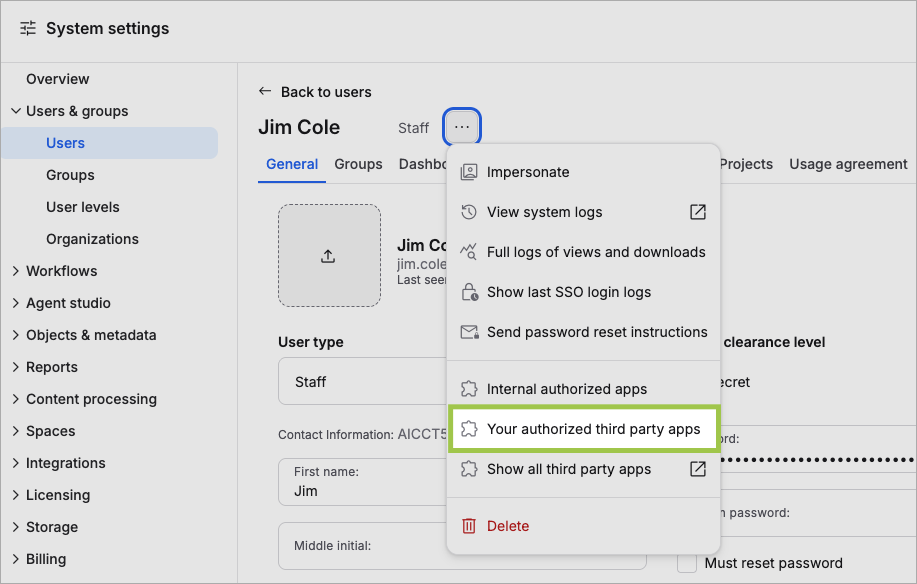
Administrators with access to a user’s account can revoke a user’s MCP session in the Orange Logic interface.
-
Open the user’s account in System Settings.
-
Select Your authorized third-party apps in the action menu.The Third-party authorized applications window opens.
-
Click the Revoke access button for the applications.